
Clinic billing that closes the day balanced.
VAT tax invoices, a cashier desk built for speed, patient deposits, controlled discounts and price lists per branch — on the same record as the visit, so the till, the bill and the claim agree.
VAT-ready · Discount approvals · Tabby & Tamara
- NABIDH
- DHA-ready
- DHPO / eClaimLink
- Encrypted & backed up
- Local UAE team
Cash leaks at the front desk are small, frequent and invisible
A discount nobody approved, a deposit nobody applied, a price that differs between branches, a refund that never reached the ledger. None of it is dramatic — but at the end of the month the numbers do not reconcile.
ClinicGateway puts limits, approvals and a full trail around every one of those moments.
Billing & Finance Inside ClinicGateway
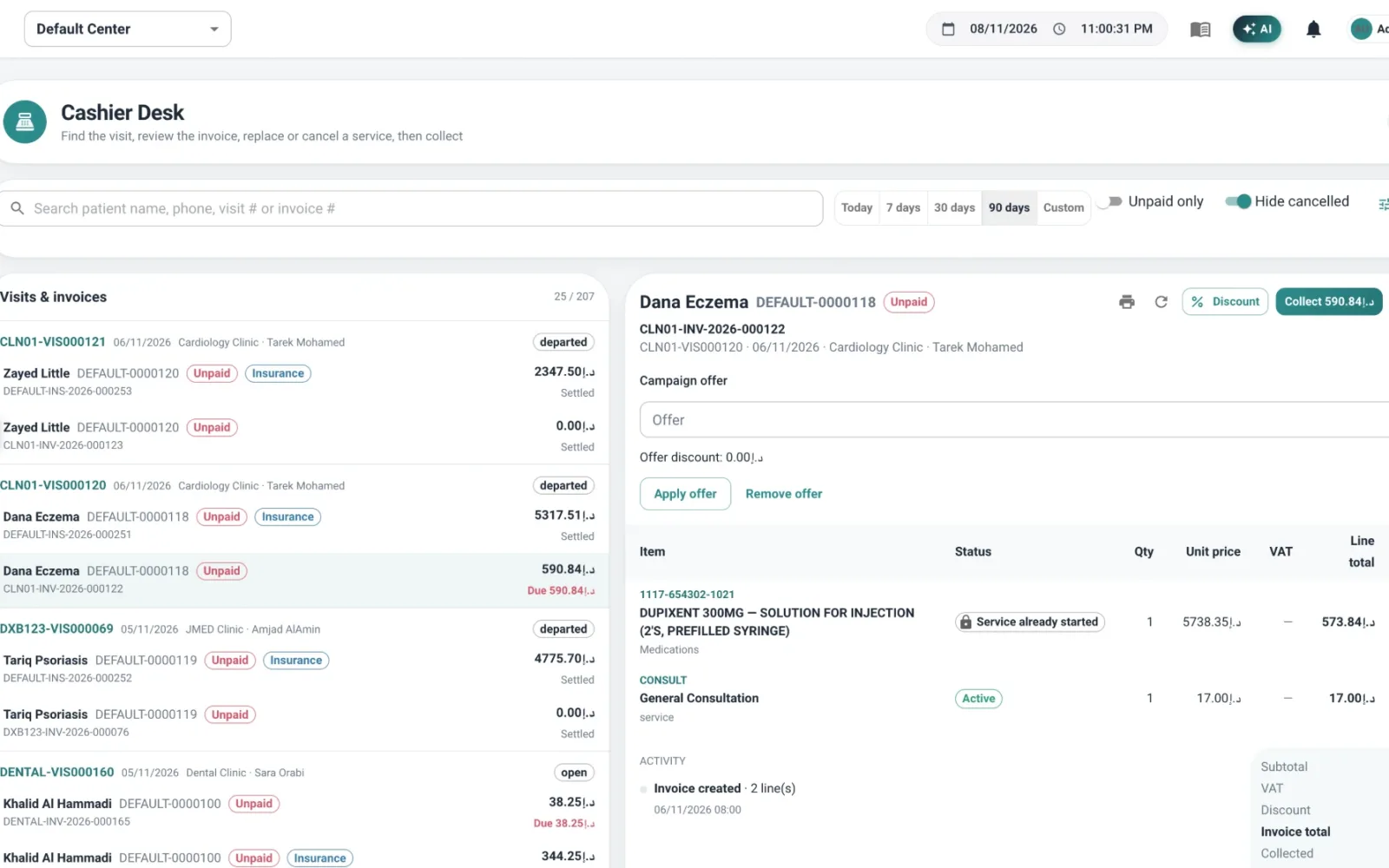
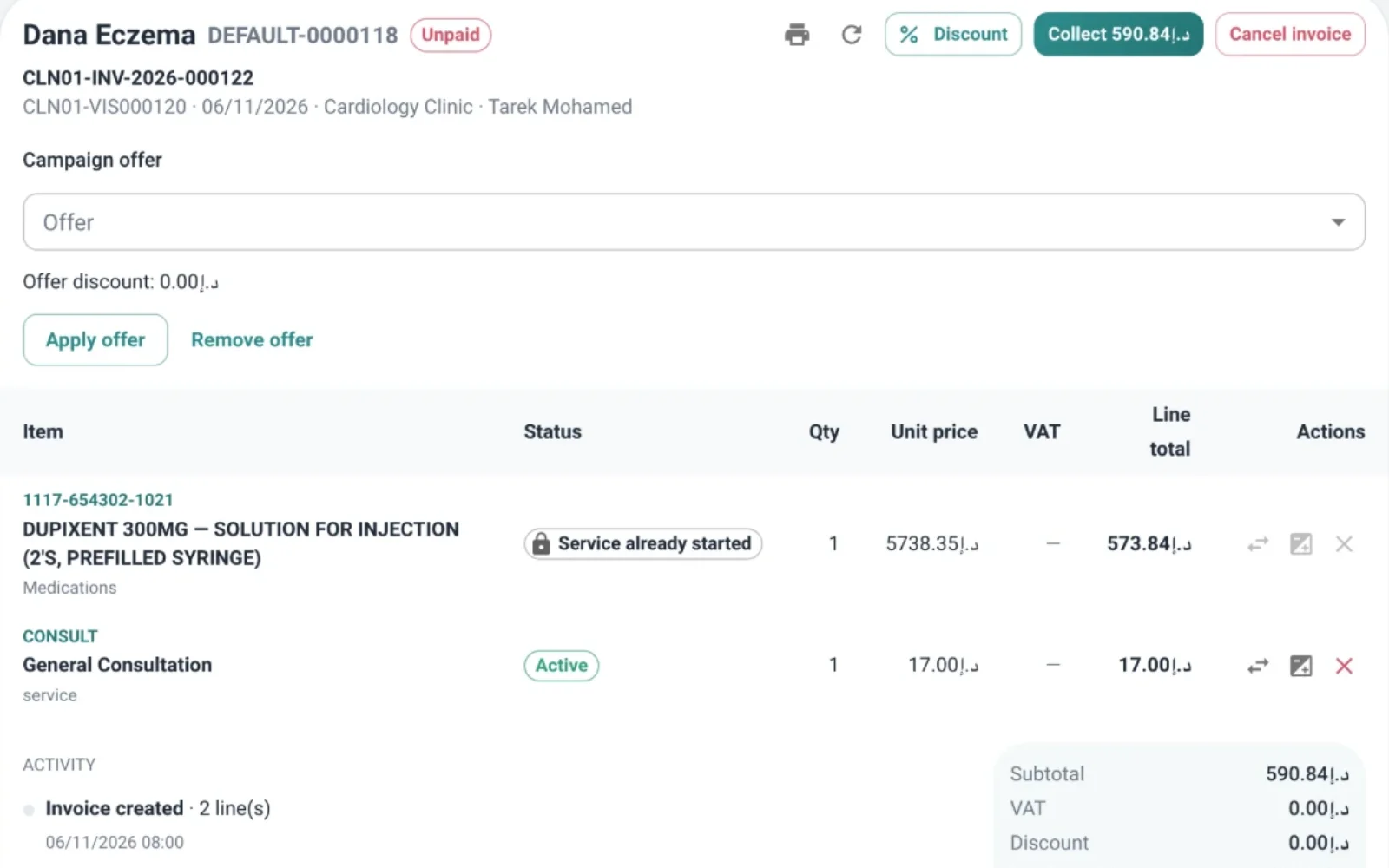
Invoices done properly
Printable VAT tax invoices with VAT set per service and a clinic default, so standard-rated and zero-rated services sit on one bill. Credit notes, cancellations and partly paid invoices are all handled.
- VAT per service line
- Credit notes and cancellations
- Cancel into a refundable deposit
A cashier desk built for the queue
Find a patient by name, phone, visit or invoice. Before collecting, replace an item, change a quantity or cancel a line — each with a reason and a before-and-after price preview.
- One search box
- Replace, re-quantify or cancel a line
- Deposits applied at collection
Discounts with guard-rails
Each role has a discount authority — a percentage cap, an amount cap or both. Anything larger goes up the approval chain with in-app notifications. Campaign discounts are time-boxed, never stack and never reduce the insurer’s share.
- Authority per role
- Receptionist → manager → owner
- Campaigns with analysis reports
Every branch, every dirham accounted for
Price lists per center and clinic with price history, numbering per branch, daily cash reconciliation and finance reports — billing sales, receipts reconciliation and outstanding ageing.
- Price lists per branch
- Daily cash reconciliation
- Outstanding ageing report
What’s included
- VAT tax invoices with VAT set per service
- Credit notes, cancellations and refundable deposits
- Cashier desk: replace, re-quantify or cancel a line before collecting
- Discount authority per role with an approval chain
- Campaign discounts with no stacking
- Daily cash reconciliation and outstanding ageing
Front-desk money problems are rarely fraud — they are a discount nobody approved, a deposit nobody applied or a price that differed between branches. ClinicGateway puts limits, approvals and an audit trail around each of them, so the till balances and the owner can see why.
Patients pay the way they prefer — cash, card, bank transfer, Tabby or Tamara — and every payment lands on the same visit record as the care.
Common questions
Are clinic services zero-rated or 5% VAT?
Does it produce UAE tax invoices?
Can patients pay with Tabby or Tamara?
How do discount approvals work?
How do deposits and refunds work?
How is a maximum co-payment applied?
More of ClinicGateway
Insurance Contracts & Price Lists
Every insured visit priced right at booking.
Packages & Memberships
Sell, track and rebook packages automatically.
Denial Management & Remittance
Post what insurers paid. Recover what they didn’t.
Doctor Share & Payouts
Each doctor’s share terms and revenue, in one place.
Analytics & Dashboards
Clinic productivity and financial overview dashboards.
Appointment Scheduling
Smart scheduling, waitlists and recalls.
See Billing & Finance on your clinic’s workflow
15 minutes, no jargon, with someone who knows how UAE clinics run.