
Insurance contracts that price every visit correctly.
Set up insurers, TPAs, networks and plans once. Contract prices and co-pay rules flow down the tree, so reception sees the patient’s share at booking — and the claim matches the contract.
Built for UAE payers & TPAs · Arabic & English · Book a demo
- NABIDH
- DHA-ready
- DHPO / eClaimLink
- Encrypted & backed up
- Local UAE team
Most rejected claims were priced wrong before the patient sat down
A UAE clinic can work with dozens of insurers, each with its own TPA, networks, plans, classes and price list. When that lives in a spreadsheet and the front desk’s memory, the wrong price or co-pay goes on the bill, the patient disputes it and the claim comes back.
ClinicGateway keeps the contract in the system. Booking and Order Entry ask it for the price, the patient share and whether approval is needed — every time.
Insurance Contracts & Price Lists Inside ClinicGateway
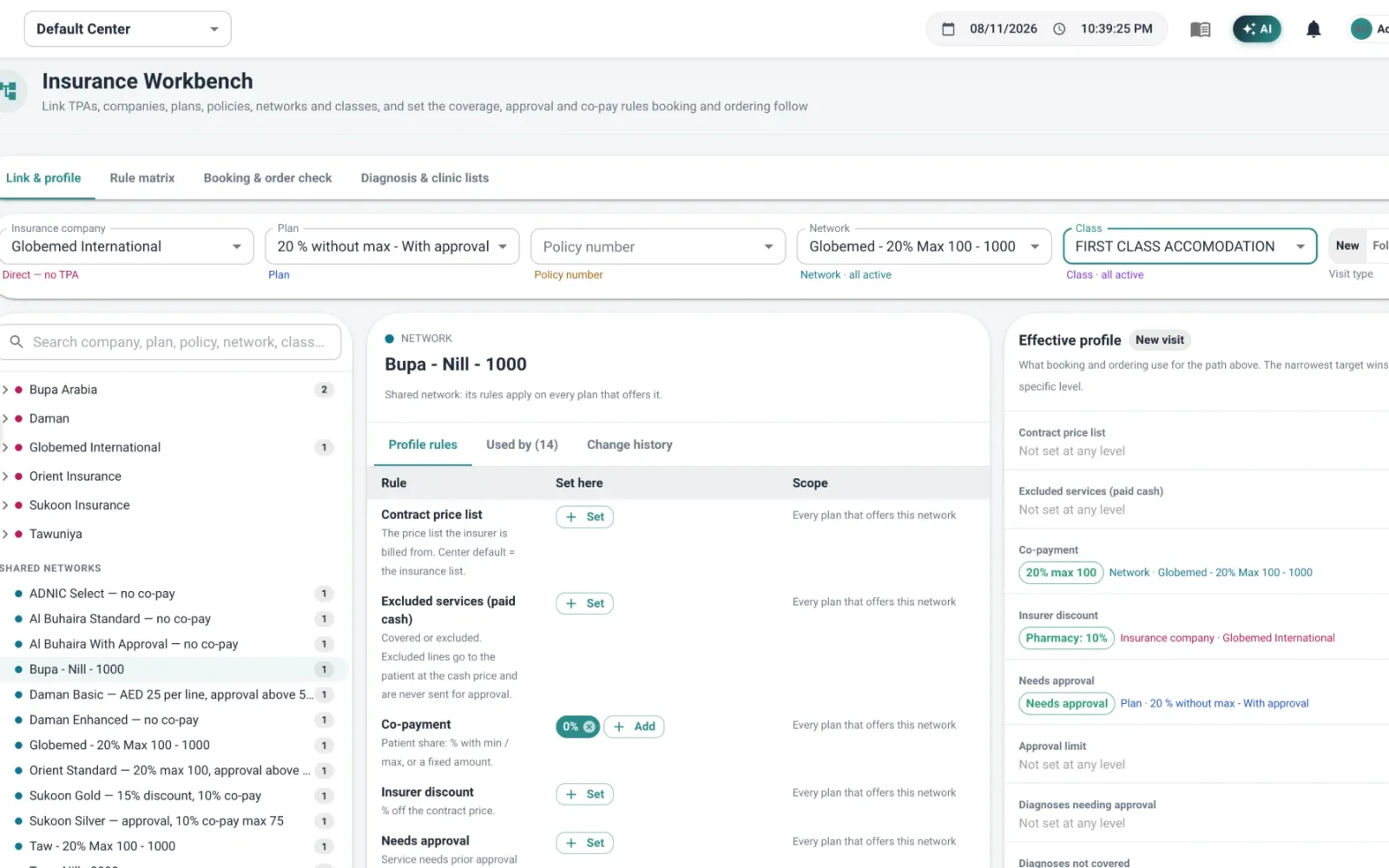
The whole payer path in one tree
Center defaults, TPAs, insurers, plans, policy numbers, networks and classes in one navigable tree. Each level shows what is set there and what it inherits from above.
- Seven levels, one screen
- Set here vs. inherited, side by side
- Search any insurer, plan or policy
Rules where they belong
Set the common rule once at the insurer and only the exceptions lower down — for all services, a billing group, one item, or one visit type (new, follow-up, walk-in). A rule matrix shows which rule wins on any path.
- Co-pay by %, minimum and maximum
- Fixed co-payment per visit, VAT included
- Rules by visit type
Contract price lists
Attach contract price lists to an insurer or plan and the right price is used automatically at booking and in doctor orders, with a price check that shows how each figure was reached.
- Contract price list per payer
- Price check at booking & order
- Branch-specific prices supported
Audit-ready by design
Rules are never deleted. Ending a rule stops it today and keeps it in the change history, with who added, changed or ended it and when.
- Dated rules with start and end
- Full change history per level
- eClaimLink payer & TPA IDs stored
What’s included
- Insurer, TPA, plan, policy, network & class in one tree
- Contract price lists per insurer
- Rules inherited down the tree, overridden where needed
- Co-payment by %, minimum, maximum or fixed per visit — VAT included
- Patient share shown at booking and in Order Entry
- Full change history — rules are ended, never deleted
Most claim problems start before the patient is seen: the wrong price list, a co-pay nobody applied, a plan that needed approval. ClinicGateway puts the contract into the system once, and every booking and doctor order is priced from it.
Because the rules live in a tree, you set the common case at the insurer and only the exceptions at the plan, policy, network or class — and you can always see which rule is winning, and why.
Common questions
How do TPAs, networks and plans fit together?
How is co-payment calculated when VAT applies?
Can one insurer have different prices per branch?
Can reception see the patient’s share before the visit?
What happens when a contract changes or expires?
More of ClinicGateway
Prior Approvals
Pre-authorisation requests that go out complete.
Claim Scrubbing & Payment Check
Catch rejections before the insurer does.
Insurance & e-Claims
DHPO / eClaimLink submission with fewer rejections.
Denial Management & Remittance
Post what insurers paid. Recover what they didn’t.
Billing & Finance
VAT invoices, a cashier desk and a balanced day.
Appointment Scheduling
Smart scheduling, waitlists and recalls.
See Insurance Contracts & Price Lists on your clinic’s workflow
15 minutes, no jargon, with someone who knows how UAE clinics run.