
Know what is in every account and what every supplier is owed.
Bank accounts and cash boxes per center and clinic, supplier payments against purchase orders and expenses with VAT and the bill attached, each recorded with who did it and when.
Included on Enterprise · Accounts & cash boxes · Supplier payments · Expenses
- NABIDH
- DHA-ready
- DHPO / eClaimLink
- Encrypted & backed up
- Local UAE team
The clinic knows what it bought, not what it paid
Purchase orders are in the clinic system, the bank statement is in the bank’s portal, and the cash box has a notebook. When a supplier calls about an unpaid invoice, nobody can say quickly what was paid, from which account, and by whom.
ClinicGateway records the clinic’s accounts and every payment out of them next to the purchase orders, so the answer is on one screen.
Finance: Accounts, Payments & Expenses Inside ClinicGateway
Accounts and cash boxes
Set up the center’s and each clinic’s bank accounts and cash boxes with an opening balance; each shows a live balance. Cards are linked to the bank account they draw on. Record deposits by hand and move money between accounts, for example from the bank to a clinic’s cash box. A cash box cannot be paid out below zero.
- Bank accounts and cash boxes per clinic
- Cards linked to a bank account
- Deposits and transfers between accounts
Supplier payments against purchase orders
Pay a supplier against a purchase order from any account, card or cash box, in parts or in advance. Each purchase order shows Unpaid, Part paid, Paid or Credit due, and each supplier shows what is still owed.
- Part and advance payments
- Payment status on every purchase order
- What each supplier is owed
Expenses and statements
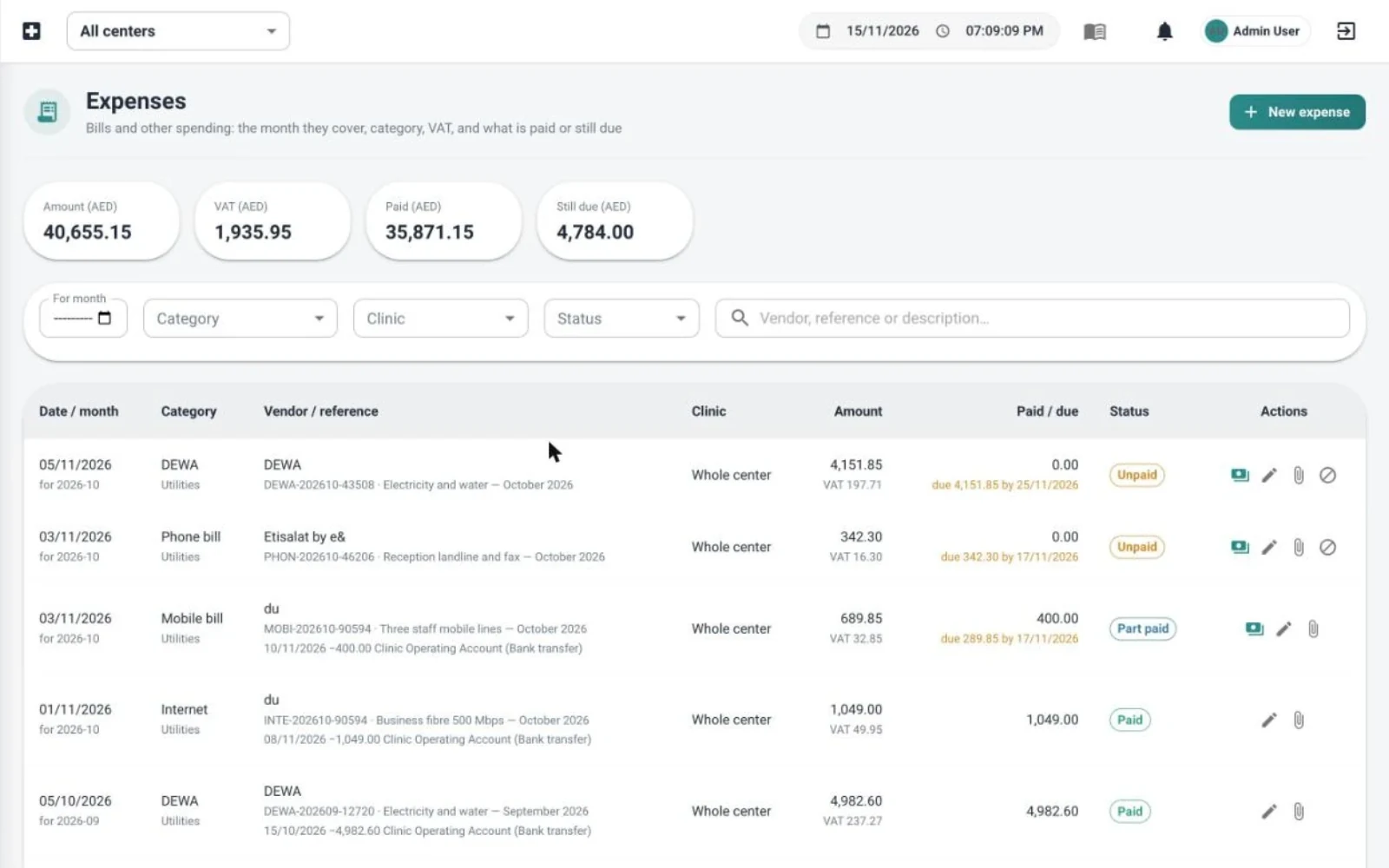
Record expenses under a two-level category list you keep, such as Utilities → DEWA or Staff expenses → lunch, with date, month covered, amount, VAT, supplier TRN and due date. Pay at once or later in parts, attach the supplier’s bill, and void with a reason. Every account has a statement with running balance, who recorded each movement and when.
- Main and sub-categories
- Pay now or later, in parts
- Statements with running balance
What’s included
- Bank accounts and cash boxes per center and clinic, with live balances
- Cards linked to a bank account, stored by their last four digits
- Deposits and transfers between accounts, e.g. bank to a clinic’s cash box
- Supplier payments against purchase orders, in parts or in advance
- Expenses by category with VAT, supplier TRN and the bill attached
- Statement per account: running balance, who recorded each line and when
Most clinics know what they ordered but not what they have paid for it. Purchase orders sit in one system, the bank statement in another and the petty-cash book in a drawer. ClinicGateway keeps the accounts and every payment out of them next to the purchase orders, so what each supplier is still owed is one screen away.
Balances are worked out from the recorded movements, and mistakes are voided or reversed with a trace instead of deleted. Finance is included on the Enterprise plan.
Common questions
Is this a full accounting system?
Are patient payments added to the accounts automatically?
Who can see and pay from an account?
Can a payment be changed or deleted?
More of ClinicGateway
Inventory, Stores & Dispensing
Stores per clinic, batches and stock that leaves with the order.
Billing & Finance
VAT invoices, a cashier desk and a balanced day.
Report Library
Claims, billing, appointments and finance reports, exported to Excel.
Analytics & Dashboards
Clinic productivity and financial overview dashboards.
Doctor Share & Payouts
Each doctor’s share terms and revenue, in one place.
AI Value & AI Cost Controls
What the AI costs, what it earned and a budget per center.
See Finance: Accounts, Payments & Expenses on your clinic’s workflow
15 minutes, no jargon, with someone who knows how UAE clinics run.