
Every clinic report in one place, ready for Excel.
Claims, billing, appointments, finance and inventory reports, each a filterable list by center, clinic, doctor, insurer and date, exported to Excel, with access given report by report.
Included on Enterprise · Filter by center, clinic, doctor, insurer · Excel export
- NABIDH
- DHA-ready
- DHPO / eClaimLink
- Encrypted & backed up
- Local UAE team
Month-end should not need three exports and a spreadsheet
The insurance team wants rejected claims, the finance manager wants revenue by doctor, the owner wants missed appointments. In many clinics each answer means exporting from a different screen and stitching the results together by hand.
The Report Library puts all of them in one Reports area, read from the same records the clinic works on.
Report Library Inside ClinicGateway
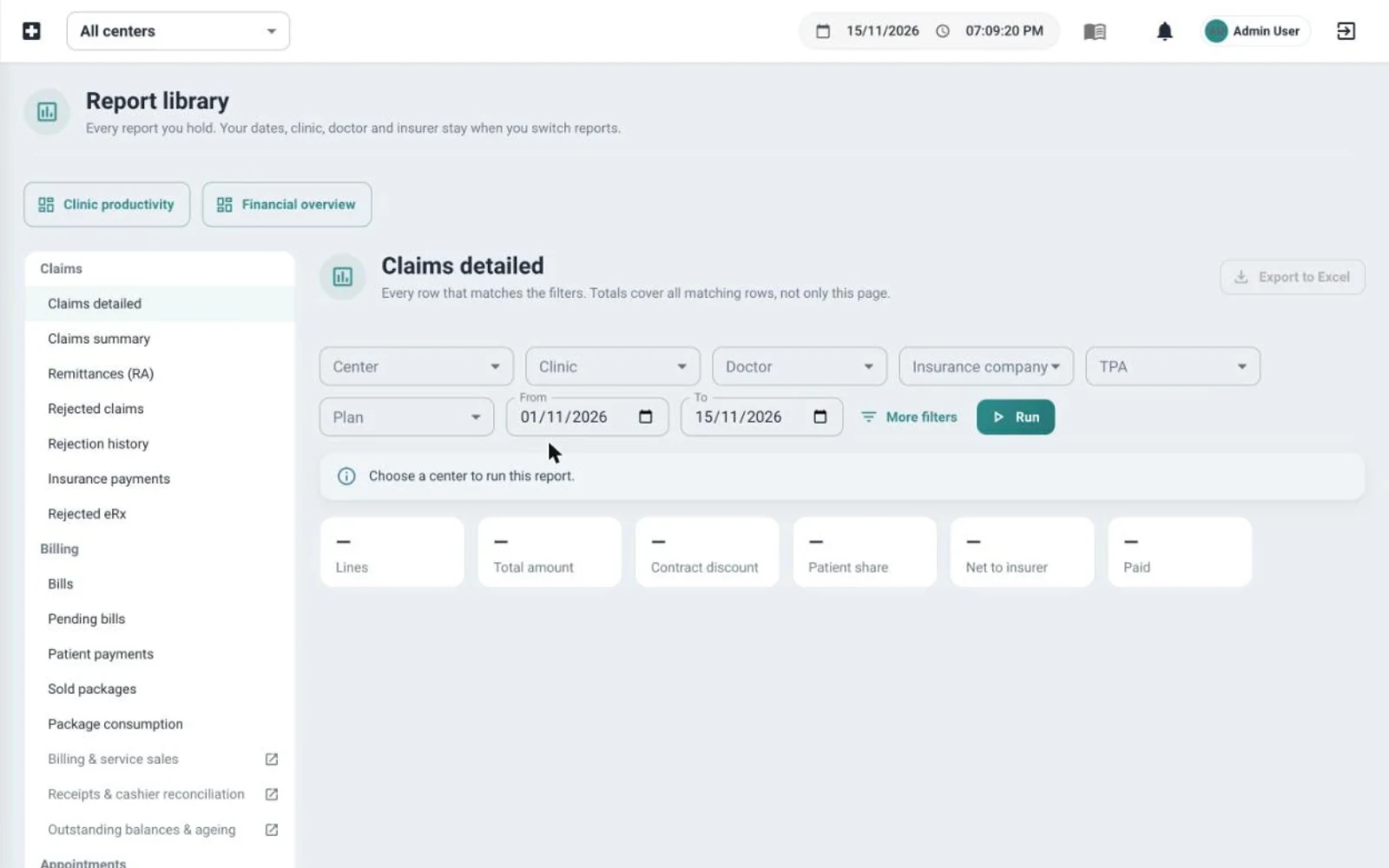
Claims and billing
Claims: Claims detailed, Claims summary, Remittances (RA), Rejected claims, Rejection history, Insurance payments and Rejected eRx. Billing: Bills, Pending bills, Patient payments, Sold packages and Package consumption, plus Receipts & cashier reconciliation and Outstanding balances & ageing.
- Remittances and rejections
- Bills, payments and packages
- Receipts reconciliation and ageing
Appointments, finance and inventory
Appointments: List of appointments, Missed appointments and Visits, with Doctor productivity. Finance: Revenue by doctor, by clinic and by center. Inventory: stock on hand and value, expiring batches, stock movements, consumption, stock cost per visit and more.
- Missed appointments and visits
- Revenue by doctor, clinic and center
- Stock, expiry and consumption
Filters, export and access
Every report filters by center, clinic, doctor, insurer and date, and exports to Excel. Access is given per report and per role, and the Clinic productivity and Financial overview dashboards open these lists when you click a figure.
- Same filters on every report
- Excel export
- Access per report and role
What’s included
- Claims, Billing, Appointments, Finance and Inventory report groups
- Filter by center, clinic, doctor, insurer and date
- Every report exports to Excel
- Access to each report is given per role
- Revenue by doctor, by clinic and by center
- Two dashboards that open the lists behind their figures
Month-end in most clinics means someone exporting from three screens and stitching a spreadsheet together. The Report Library reads the same records the clinic works on, so a report run today shows today’s claims, bills and bookings, and the Excel file matches the screen.
Who sees what is set per report: the insurance team can run claims reports without seeing revenue by doctor, and the finance manager can run revenue without the clinical lists. The Report Library is included on the Enterprise plan.
Common questions
Which reports are included?
Can we export to Excel?
Can we limit who sees which report?
Do reports cover more than one branch?
More of ClinicGateway
Analytics & Dashboards
Clinic productivity and financial overview dashboards.
Insurance & e-Claims
DHPO / eClaimLink submission with fewer rejections.
Denial Management & Remittance
Post what insurers paid. Recover what they didn’t.
Billing & Finance
VAT invoices, a cashier desk and a balanced day.
Finance: Accounts, Payments & Expenses
Bank accounts, cash boxes, supplier payments and expenses.
Inventory, Stores & Dispensing
Stores per clinic, batches and stock that leaves with the order.
See Report Library on your clinic’s workflow
15 minutes, no jargon, with someone who knows how UAE clinics run.